Guide · QA + AI series · 20/31 · November 13, 2026 · 6 min read
Prompt regression: version, compare and don't break what worked
Treating every prompt change as a code change: version, side-by-side comparison and a regression set that decides the merge.
A prompt in production is code that gets modified often and almost never tested. Someone finds a failing case, adds a sentence to fix it, tries it on that same case, sees it works and ships it. A week later three cases that used to work no longer do. Nobody connects one thing with the other, because there's no record of what changed or how it was before.
It's a classic regression problem, and it's solved with the classic tools adapted: versions, small changes, side-by-side comparison and a regression set that grows. This guide builds that flow and adds two cautions specific to models: looking at errors by type and watching that prompt examples don't leak from the test set.
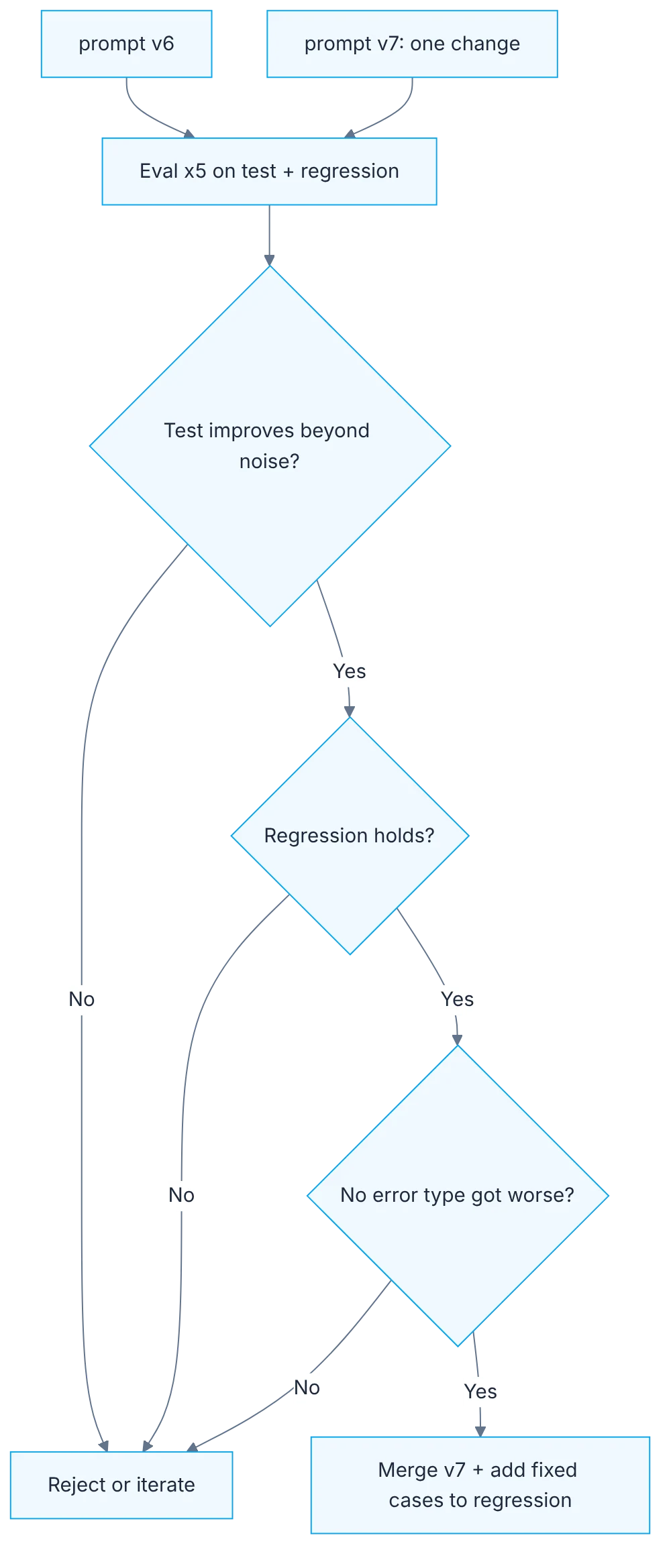
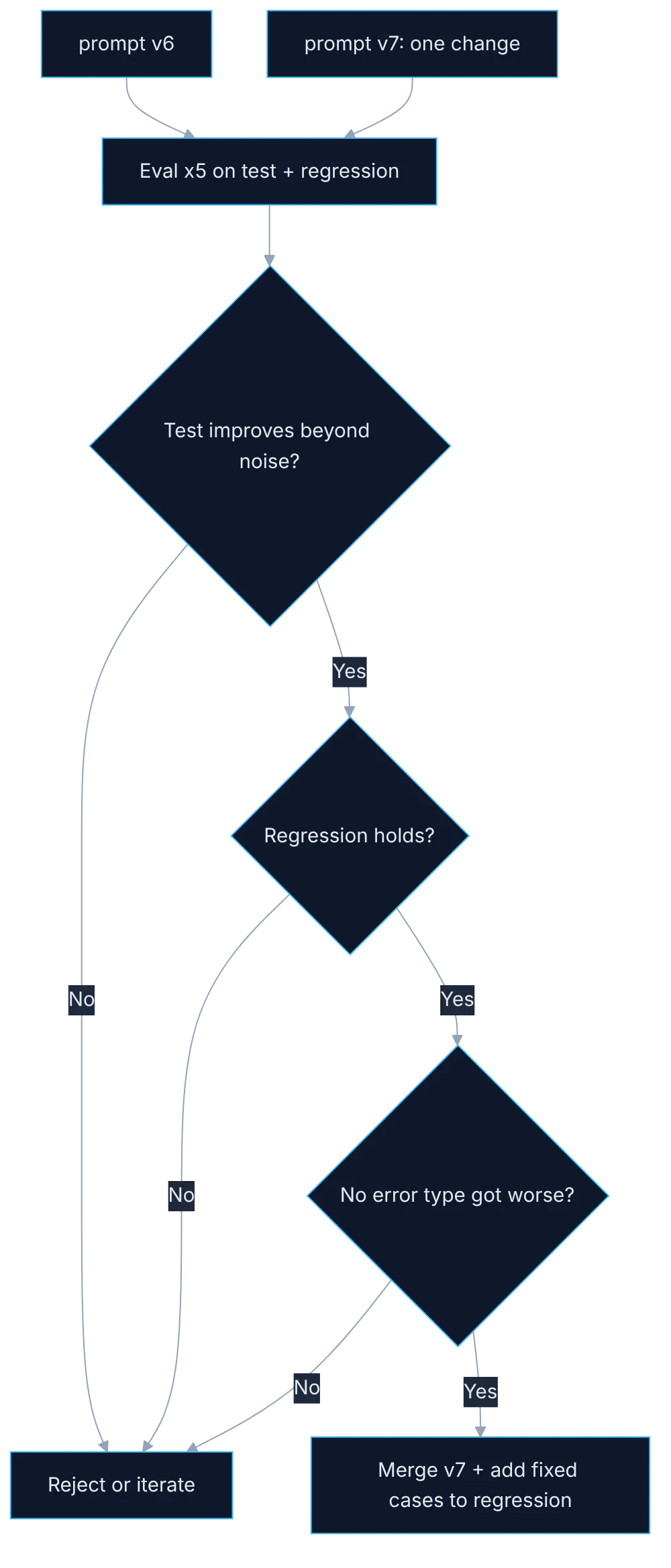
How it fits together
Show the diagram as text
prompt v6 ──────────────┐
prompt v7 (one change) ─┴─▶ eval x5 on test + regression
                               ▼
        test improves beyond noise? ──── no ──▶ reject or iterate
                               ▼ yes
        regression holds? ────────────── no ──▶ reject or iterate
                               ▼ yes
        no error type got worse? ─────── no ──▶ reject or iterate
                               ▼ yes
        merge v7 + add fixed cases to regression
Requirements
- A golden dataset with
testandregression(day 17). - Two prompt versions in separate files.
Setup
prompts:
  - file://../prompts/classifier.v6.txt
  - file://../prompts/classifier.v7.txt
providers:
  - id: openai:chat:YOUR_PINNED_MODEL_ID
    config: { temperature: 0 }
tests: file://../data/golden/test.jsonlnpx promptfoo eval -c evals/classifier-regression.yaml --repeat 5
npx promptfoo view## v7
- Added rule: performance complaints with no blocked flow are "medium", not "high".
- "critical" is now only for blocked payment, login or data loss.
- Examples in the prompt are NOT taken from the test set.Step by step
1. One version, one file, one changelog line
Each prompt version is a file, with a changelog line stating which rule changed and why.
Each prompt version is its own file with its number, and each has a changelog line stating which rule changed and why. Don't overwrite the previous file, because you'll need it to compare. The why matters as much as the what. "Added rule for performance complaints" isn't enough. Add which case motivated it. Months from now someone will want to remove that rule, and without the reason they won't know what it might break.
2. One change per version
One change per version. If you change three things at once, you don't know which one moved the result.
If in a single version you rewrite a rule, add an example and change the output format, and the result moves, you don't know which of the three moved it. One may even have improved things and another worsened them, and you see a tie. One change per version means each measurement has a single possible explanation. It looks slower. In practice it's faster, because you don't waste time untangling mixed changes to find the one that caused the problem.
3. Side by side, five times
Run both versions side by side on the test set, 5 times, and on the regression set.
Set up the eval with both versions as prompts in the same file, so they run on the same cases. Use the test set and the regression set as well, with five repetitions. The viewer shows the two columns and lets you filter the cases where one version passes and the other doesn't. Those are the cases to read. That's where you see what you fixed, what you broke and what changed its answer without changing its verdict.
4. Movement by error type
Look at movement per error type, not just the total. Fixing one type often raises another.
The total can stay the same while everything shifts underneath. Classify failures by type and compare the count of each type across versions. It's common for a new rule to fix one category and worsen another. An instruction making the model more cautious with complaints, for example, can make it under-flag real blockers. If you look only at the overall percentage, that trade stays hidden, and you'll discover it in production.
5. Leaks between prompt and test
Check for leakage: examples you put in the prompt can't be test set cases.
The examples you put in the prompt can't be test set cases, nor nearly identical ones. If they are, the model sees the answer before the question and the metric rises with nothing having improved. It's an easy leak to commit: the failing case is exactly the one you want to use as an example. Take examples from the dev set or write them from scratch, and verify with a text search that none appears in test.
6. The merge rule
Merge rule: test improves beyond noise and regression doesn't drop. Then the newly fixed cases join the regression set.
Define in advance when a new version replaces the previous one: the test set improves beyond noise, meaning no overlapping ranges, and the regression set doesn't drop. If it qualifies, it merges. Afterwards, the newly fixed cases join the regression set. That way every solved problem stays protected for good. If it doesn't qualify, the version is discarded or worked on further, but it doesn't ship "because it looks better".
Illustrative example
A ticket classifier marks any slowness complaint as blocking. The team creates version seven with a single new rule: performance complaints with no blocked flow are medium severity. They run it against version six, five times. On test, the mean rises from 82 to 88 with no overlapping ranges. On regression, one case drops: a ticket saying "it takes so long I can't pay" now comes out as medium. That's a real blocker. They adjust the rule's wording in a version eight, run again, and regression is complete. They merge eight and add four new cases to the regression set. The figures are illustrative.
Common mistakes
- Overwriting the prompt without keeping the previous version.
- Putting several changes into a single version.
- Trying the change only on the case that motivated it.
- Using test set cases as prompt examples.
Checklist: how to know it is done
- Each prompt version is a file with its changelog line.
- The new version has a single change from the previous one.
- Both versions ran side by side on test and on regression.
- The fixed cases were added to the regression set.
Where AI fell short
Adherence to a prompt rule is probabilistic. Measure in what percentage of runs it's honored.
Frequently asked questions
How many old versions should I keep?
They're all in git history, so keeping them costs nothing. In the working folder, the production version and the candidate are enough. What matters is being able to reconstruct any earlier version to compare.
What happens when the model changes instead of the prompt?
Same procedure. A model change is a new version compared side by side against the current one with the same prompt, and merged under the same rule. It's best not to change both at once.
Doesn't the regression set grow too large?
It grows slowly, a handful of cases per change. If it ever becomes expensive to run, you can group equivalent cases and keep one representative of each type. Don't trim it by removing the ones that always pass: that is exactly their job.
Day 20 of 31 of the 31 days of QA + AI series. Commands and versions reviewed in November 2026: rerun them before relying on them, AI tooling changes fast.
← Previous: Cost as a quality metric: top-K prefiltering before the model
Next: Testing RAG: retrieval, faithfulness and answer, separately →