Guide · QA + AI series · 22/31 · November 13, 2026 · 7 min read
A model for security testing (1): threat modeling with the OWASP LLM and Agentic Top 10
How to build the threat model of an AI feature and turn it into testable abuse cases.
Security testing of an application with models tends to start at the end: someone runs an attack tool, gets a long report and doesn't know what to do with it. Without a threat model, there's no way to decide which of those findings matter for your system, nor which risks went untested because no tool covers them.
Threat modeling is the thinking part before attacking. You draw the system, mark where text you don't control comes in and walk through lists of known risks to see which apply. OWASP maintains two that serve as a guide: one for LLM applications and one for agentic applications. This guide takes you from the drawing to a threat table with concrete abuse cases and a decision for each.
How it fits together
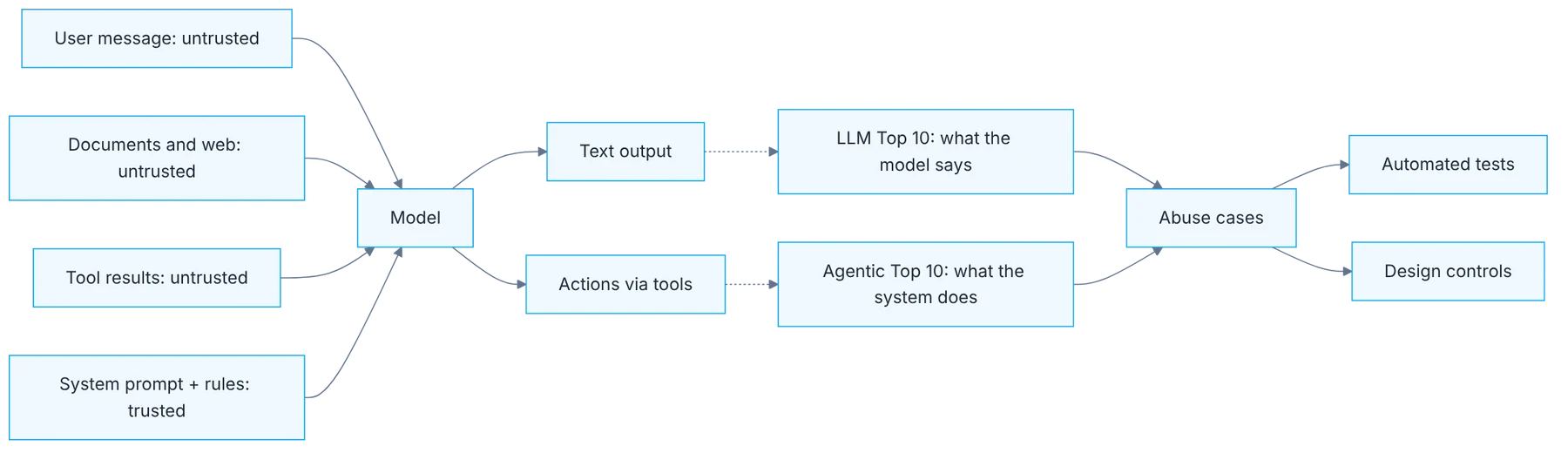
Show the diagram as text
user message (untrusted) ──────┐
documents / web (untrusted) ───┤
tool results (untrusted) ──────┼─▶ model ─┬─▶ text output  ▶ LLM Top 10: what the model says
system prompt + rules (trusted)┘          └─▶ tool actions ▶ Agentic Top 10: what the system does
                                                   ▼
                                              abuse cases
                                        ├─▶ automated tests
                                        └─▶ design controls
Requirements
- An AI feature of your own or a practice one (a support assistant works).
- The current OWASP GenAI Security Project lists (genai.owasp.org): Top 10 for LLM Applications, 2026 edition, and Top 10 for Agentic Applications.
- Only systems you own or are authorized to test.
Sample threat table
- Chat: the user message is untrusted input. Risk: Prompt Injection. Abuse case: the user asks to ignore the rules and see another customer's data. Covered by a test.
- RAG: an uploaded document is untrusted input. Risk: indirect Prompt Injection. Abuse case: a document carries hidden instructions. Covered by a test plus a control.
- Email tool: model output triggers an action. Risk: Excessive Agency. Abuse case: the model sends an email without approval. Covered by a design control.
Step by step
1. Draw the system
Draw the system: inputs (user, documents, web, tools), model, outputs and the actions it can execute.
Start with a simple diagram with four kinds of elements: inputs, the model, outputs and actions. Under inputs, list everything reaching the model: user messages, retrieved documents, web pages, tool results and system instructions. Under actions, everything the system can do besides answering: query a database, send an email, modify a record. No special tool is needed. What matters is that the drawing is made or validated by someone who knows the real architecture.
2. Trust boundaries
Mark trust boundaries: every place where the model reads text your team doesn't control.
On the diagram, mark every place where the model reads text your team neither wrote nor controls. The user message is the obvious case. The less obvious ones bring the most trouble: a document uploaded by a customer, the content of a web page, a free-text field in a ticket, a third-party API response. To a model, all of that is text in its context, and it doesn't reliably tell data from an instruction. Every boundary is a possible entry point.
3. The Top 10 for LLM applications
Walk the Top 10 for LLM Applications and flag which risks apply. Prompt Injection stays first in the 2026 edition and Sensitive Information Disclosure second.
Walk the list risk by risk and, for each one, ask whether it applies to your diagram. Prompt injection and sensitive information disclosure head the list, and apply to almost any system. Others depend on the architecture: supply chain risks apply if you use third-party models or components; insecure output handling, if what the model generates ends up being executed or displayed without validation. Mark applies or doesn't apply, with one line of justification.
4. The Top 10 for agentic applications
If the system has tools, memory or acts on its own, add the Top 10 for Agentic Applications: there the risk is no longer what the model says but what it does.
If your system has tools, memory or acts without approval at each step, add the second list. The underlying shift is that the risk stops being what the model says and becomes what it does. Wrong text can be corrected; a sent email or a deleted record can't. This is where risks such as tool misuse, excessive permissions and memory manipulation appear. Check each tool in your diagram against the list.
5. Concrete abuse cases
For each applicable risk, write a concrete abuse case: who, through which entry point, achieving what.
For each applicable risk, write an abuse case with three parts: who, through which entry point and achieving what. "Prompt injection" is a category. "A customer uploads a PDF with hidden text instructing the assistant to include another customer's data in its answer" is an abuse case. The difference is that the second can be turned into a test. If you can't write the concrete case, you haven't yet understood how that risk shows up in your system.
6. Prioritize and decide
Prioritize by impact and exposure, and decide what gets automated tests (day 23) and what needs a design control: least privilege or human approval.
Order the cases by impact and exposure: how serious it would be and how easy it is to reach that entry point. Then make a decision for each. Some get covered by automated tests, which is tomorrow's topic. Others aren't solved by testing but by design: removing a tool from the agent, requiring human approval before an irreversible action, limiting possible destinations. A design control is worth more than a hundred tests of a risk that shouldn't exist.
Illustrative example
A team models a support assistant that reads tickets, queries an orders database and can send emails. The diagram shows three trust boundaries: the user message, ticket attachments and the shipping API's responses. Six risks from the first list apply; four from the second. They write nine abuse cases. The highest-impact one: an attachment with hidden instructions makes the assistant email the data of someone else's order. They decide two things. The email tool can only write to the ticket's sender, a design control. And the other eight cases become automated tests.
Common mistakes
- Running an attack tool before having the threat model.
- Considering only the user message as untrusted input.
- Leaving risks as categories, with no concrete abuse cases.
- Trying to cover with tests what is solved by removing a permission.
Checklist: how to know it is done
- The diagram was validated by someone who knows the architecture.
- All trust boundaries are marked.
- Each applicable risk has an abuse case with who, where and what it achieves.
- Each case has a decision: test, design control or accepted risk.
Where AI fell short
A threat model generated without your architecture is a generic list. The system drawing comes from whoever knows it.
Frequently asked questions
Does the security team have to do this?
Ideally you do it together. Security brings the method and knowledge of attacks; QA brings product knowledge and the ability to turn each case into a repeatable test. A threat model made without someone who knows the system comes out generic.
How often is it updated?
Every time the architecture changes: a new tool, a new data source or a new permission. Giving an agent the ability to send messages changes the threat model more than any prompt change.
Can I ask a model to generate the threat model?
It can help walk the lists and propose abuse cases from your diagram. The diagram and the prioritization must come from you. Without your architecture, what it returns is a list that would fit any system.
Day 22 of 31 of the 31 days of QA + AI series. Commands and versions reviewed in November 2026: rerun them before relying on them, AI tooling changes fast.
← Previous: Testing RAG: retrieval, faithfulness and answer, separately
Next: A model for security testing (2): automated red teaming →