Guide · QA + AI series · 14/31 · November 13, 2026 · 7 min read
TDD with AI (2): guardrails so the agent can't cheat
The five typical ways an agent cheats on a red test and an automatic control for each.
Yesterday the cycle worked because you were watching every step. As soon as the agent works longer on its own, a known problem appears: its operating goal is for tests to pass, and there are several ways to achieve that without the code being correct. It can edit the test, return exactly the expected value, disable the annoying case or mock the very unit that was supposed to be under test.
It isn't malice. It's optimization toward the metric you gave it. The answer isn't watching it more closely but making every shortcut impossible or visible. This guide pairs five cheats with five automatic controls and takes them into the pipeline, so that trust in green doesn't depend on someone reviewing every diff with a magnifying glass.
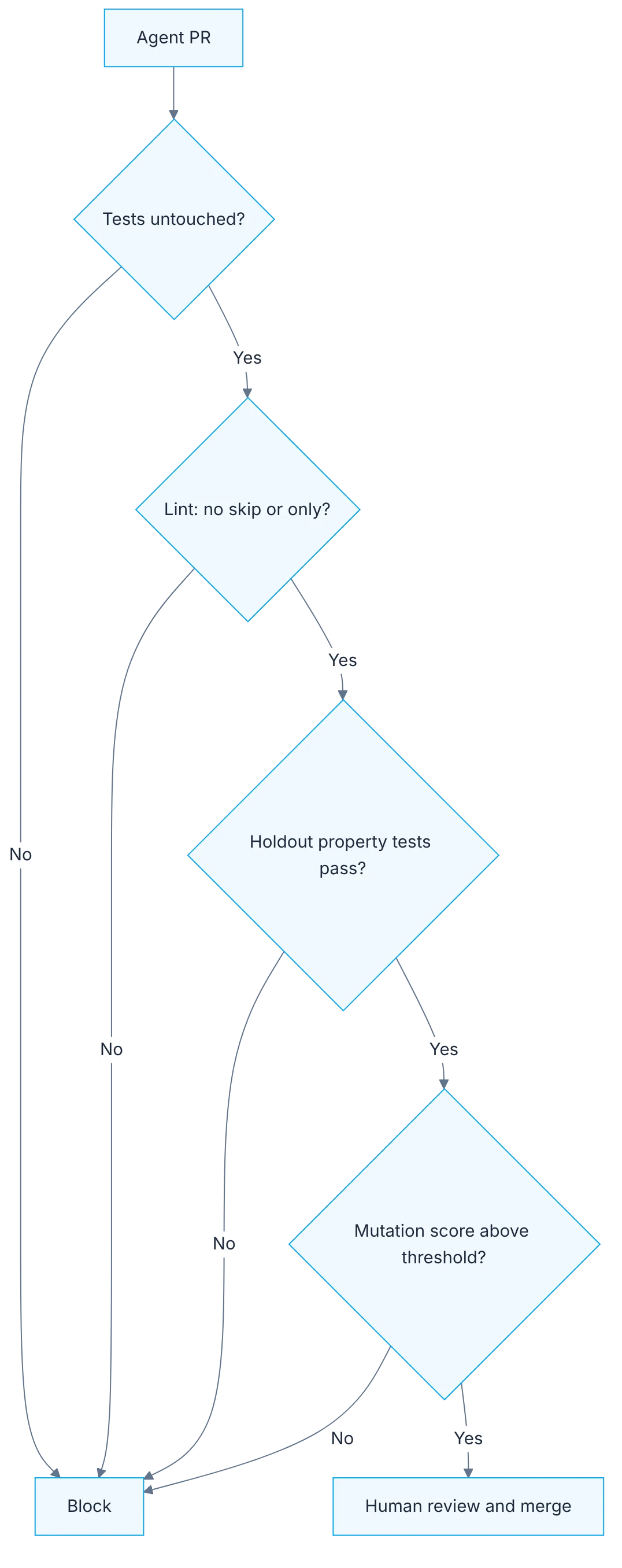
How it fits together
Show the diagram as text
agent PR
   ▼
tests untouched? ───────────────── no ──▶ block
   ▼ yes
lint: no skip / only? ──────────── no ──▶ block
   ▼ yes
holdout property tests pass? ───── no ──▶ block
   ▼ yes
mutation score above threshold? ── no ──▶ block
   ▼ yes
human review and merge
Requirements
- The
tdd-airepo from day 13.
Setup
npm i -D fast-check @stryker-mutator/core @stryker-mutator/vitest-runner
npx stryker init
import { it } from "vitest";
import fc from "fast-check";
import { applyDiscount } from "./discount";
it("total is never negative and never above the original", () => {
fc.assert(
fc.property(fc.integer({ min: 0, max: 100000 }), (total) => {
const result = applyDiscount(total, "SAVE10");
return result >= 0 && result <= total;
})
);
});# implementation PRs must not touch tests
git diff --name-only origin/main...HEAD | grep -E '\.test\.ts$' && exit 1 || echo "tests untouched"
npx stryker runCheat and control
- Editing the test so it passes: read-only tests for the agent, plus a CI guard that fails if an implementation PR touches tests.
- Hardcoding the expected value: property-based tests in a file the agent never sees (holdout).
- Adding .skip or .only: a lint rule banning disabled or focused tests.
- Mocking the unit under test: diff review, no new mock of the unit under test.
- Tests that test nothing: mutation testing. If mutants survive, the test doesn't validate.
Step by step
1. Read-only tests
Mark test files as non-editable in the agent's permissions.
The most direct control is that the agent can't write to test files. Almost every coding agent supports path-based permission rules: deny edits to the test patterns and leave the implementation folder open. With that, the most frequent cheat stops being possible instead of depending on a natural-language instruction. An instruction such as "don't touch the tests" is followed almost always; a denied permission is followed always. When a test needs to change, a person does it.
2. The CI guard
Add the CI guard for implementation PRs.
Local permissions protect your session, not the whole team's. That's why you add a check in the pipeline: if a pull request labeled as implementation modifies test files, it fails. It's a script of a few lines comparing the list of changed files against a pattern. The underlying idea is to separate specification changes from implementation changes. A PR touching both isn't forbidden, but it now requires an explicit human review.
3. Property tests out of context
Write one property test per critical function and keep it out of the agent's context.
A test with fixed examples can be satisfied by an if returning the expected value. A property test can't: it generates hundreds of inputs and checks a general property, for example that the discounted total never exceeds the original and is never negative. Write one per critical function and keep it out of what the agent reads, as a held-out validation set. It runs in CI, not in the agent's session. If the implementation only memorized the examples, it fails there.
4. Lint against disabled tests
Enable the lint rule against .skip and .only.
Adding .skip to a failing test or leaving an .only that stops the rest from running are one-word changes that go unnoticed in a long diff. A lint rule catches them effortlessly and deterministically. Enable it as an error, not a warning, and run lint in the pipeline. If your team needs to disable a test temporarily, do it through a different mechanism that requires a comment with the reason and a linked ticket.
5. Mutation testing on what was touched
Run Stryker and check the mutation score for files the agent touched.
High coverage doesn't mean tests verify anything. Mutation testing measures that directly: it introduces small changes in the code, such as flipping a condition or swapping an operator, and checks whether any test fails. If the mutant survives, that behavior isn't protected. Running it across the whole project is slow, so limit it to the files the PR changed. Look at surviving mutants in business logic: each one is a missing test or a weak assertion.
6. Everything in the pipeline
Add everything to the pipeline: if a control fails, the PR doesn't merge.
The five controls count when they block. Add them as required steps: the file guard, lint, the normal suite, the held-out property tests and mutation testing with a minimum threshold for touched files. If any fails, the PR doesn't merge. Order the steps from fastest to slowest so cheap errors show up first. The result is that green means something again, whether a person or an agent wrote the code.
Illustrative example
An agent works for an hour on a pricing module and delivers a PR with all tests green and ninety-five percent coverage. The pipeline with guardrails tells a different story. The file guard passes. Lint finds a .skip added to a rounding test. The held-out property test fails on a price of zero. Mutation testing shows half the mutants in the tax function survive: the tests executed it without verifying the result. Three findings a quick diff review wouldn't have seen. The PR goes back with three concrete requests.
Common mistakes
- Relying on a text instruction instead of a denied permission.
- Measuring test quality with coverage alone.
- Leaving property tests within the agent's reach.
- Having the controls as warnings that don't block the merge.
Checklist: how to know it is done
- The agent can't edit test files.
- The pipeline fails if an implementation PR touches tests.
- There is a held-out property test per critical function.
- Mutation testing runs on touched files with a threshold.
Where AI fell short
It produces full-coverage suites that barely catch mutants. Measure whether the test fails when the code is wrong.
Frequently asked questions
Isn't mutation testing too slow?
Across the whole project it can be. Limited to the files the PR changed, it usually takes a few minutes. You can also run it in full once a week, on a schedule, to see the trend without slowing daily work.
Which mutation score threshold makes sense?
Start by measuring the current value and don't let it drop. Raise it gradually in modules with business logic. A high number demanded all at once only gets the team to disable the control.
Do these controls help without agents?
Yes. A person in a hurry commits the same five cheats. The difference is volume: an agent produces more code per hour, so missing controls show sooner.
Day 14 of 31 of the 31 days of QA + AI series. Commands and versions reviewed in November 2026: rerun them before relying on them, AI tooling changes fast.
← Previous: TDD with AI (1): red, green, refactor with an agent