Guide · QA + AI series · 12/31 · November 13, 2026 · 7 min read
Failure triage with LLMs: from 40 red tests to 3 root causes
A triage step that groups a run's failures by probable cause, with evidence, and says "unknown" when there isn't enough.
A pipeline with forty red tests almost never has forty problems. It has two or three: a service that's down, an interface change and, with luck, a real defect. The job of whoever does triage is to discover that grouping, and it's slow, repetitive work: opening failure after failure, reading the error and recognizing you've already seen it ten times that morning.
Grouping similar text is something an LLM does well and fast. What it doesn't do well is admit it doesn't know. This guide builds an assisted triage that uses the former and guards against the latter: small, structured input, output with textual evidence, a mandatory "unknown" category and a person who confirms before closing anything.
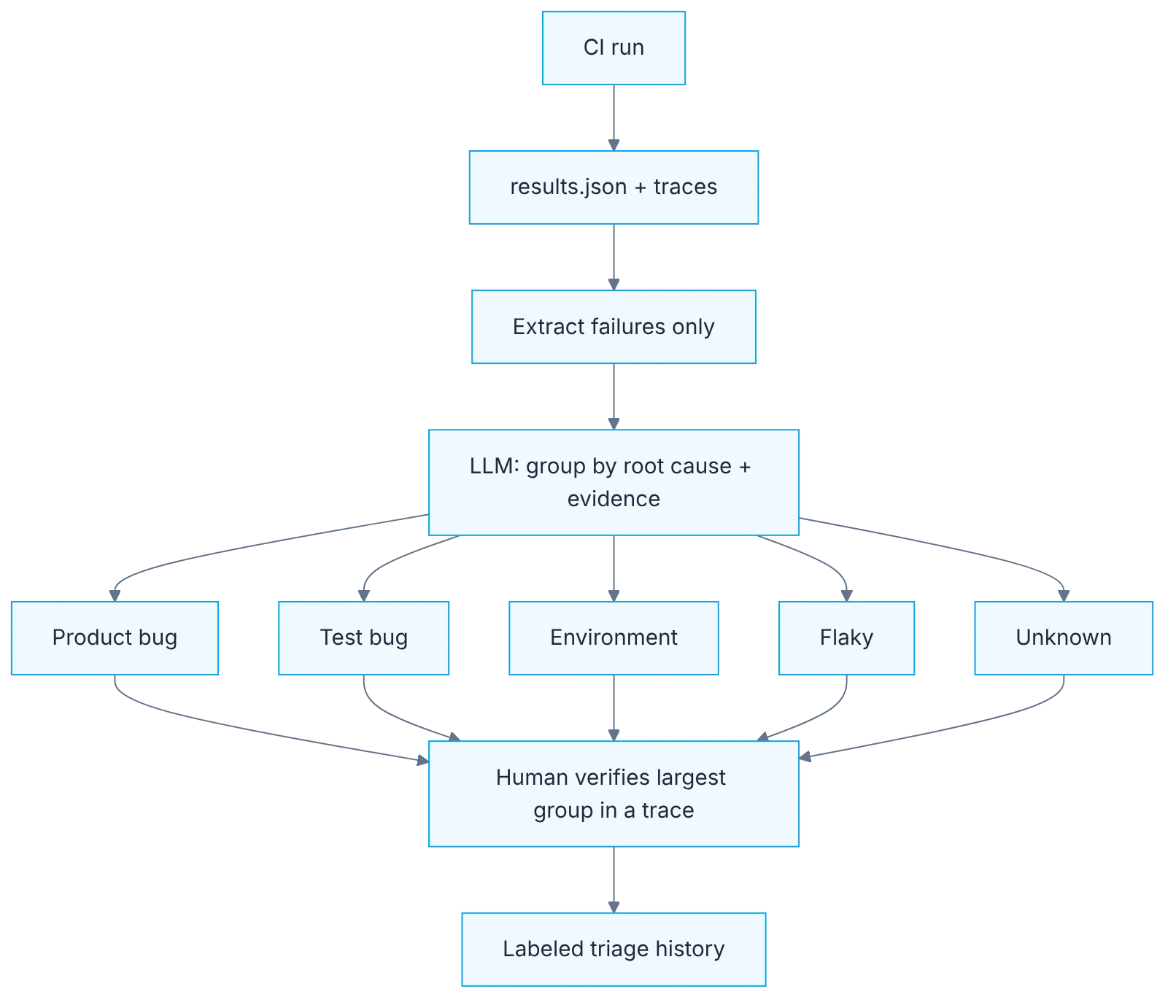
How it fits together
Show the diagram as text
CI run ▶ results.json + traces ▶ extract failures only
                                        ▼
                    LLM: group by root cause + evidence line
        ┌────────────┬──────────────┬────────────┬─────────┐
   product bug    test bug     environment     flaky    unknown
        └────────────┴──────┬───────┴────────────┴─────────┘
                            ▼
          human verifies the largest group in a trace
                            ▼
                 labeled triage history (dataset)
Requirements
- A Playwright suite with some failures.
- Traces enabled on retries.
Setup
npx playwright test --reporter=json > results.json
node scripts/failures.js > failures.json
const report = require("../results.json");
const out = [];
function walk(suite) {
(suite.suites || []).forEach(walk);
(suite.specs || []).forEach((spec) =>
spec.tests.forEach((t) =>
t.results
.filter((r) => r.status !== "passed" && r.status !== "skipped")
.forEach((r) =>
out.push({
title: spec.title,
file: spec.file,
error: (r.error?.message || "").slice(0, 400),
})
)
)
);
}
walk(report);
console.log(JSON.stringify(out, null, 1));Group these failures by probable root cause. For each group give:
category (product bug | test bug | environment | flaky | unknown), the tests in it,
and the exact error line that supports it.
If evidence is insufficient, use "unknown". Do not guess.Step by step
1. Structured results
Emit results in a structured format with the JSON reporter and keep traces from retries.
The starting point is having your runner emit results in a format a machine can read, not just an HTML report for people. Playwright's JSON reporter includes each test's title, file, status, error and retries. Also enable traces on first retry: they are the evidence you'll need to verify whatever the model proposes. Without structured data you end up pasting whole logs into a chat, which is expensive, slow and mixes noise with signal.
2. Extract only what's needed
Extract failures only: title, file and the first 400 characters of the error. Fewer tokens, better grouping.
A short script walks the JSON and keeps the failed tests: title, file and the first four hundred characters of the error. That trimming has two effects. It lowers cost, because a full log can hold thousands of irrelevant lines. And it improves the result, because the first part of the message usually holds what tells one cause from another: the error type, the locator, the HTTP code. With full stack traces, the model tends to group by superficial stack matches.
3. The triage prompt
Run the triage prompt. Require category, tests in the group and the exact evidence line.
Ask for three things per group: a category from a closed list, the tests in it and the exact error line justifying the grouping. The closed list matters: environment, data, interface change, probable defect and unknown. The evidence line must be a literal quote from the input, not an explanation. That way you can check in seconds whether the group makes sense, and a group whose evidence doesn't appear in the data gets discarded immediately.
4. Verify the largest group
Manually verify the largest group by opening a trace with npx playwright show-trace.
Before acting on the result, open the trace of one test from the largest group. Look at the timeline, the network calls and the screenshot at the moment of failure. If the proposed cause matches what you see, the group is confirmed and you've probably resolved most of the red pipeline. If it doesn't match, treat the whole result with more caution. That check takes a few minutes and is what turns a suggestion into a diagnosis.
5. Save every triage
Save each triage with your final verdict. In a few weeks you have a dataset to evaluate the prompt.
Save the input, the model's output and your final verdict in one file per run. It looks like bureaucracy and it's the most valuable part of the process. In a few weeks you have dozens of real cases labeled by someone who knows the system: exactly the dataset needed to evaluate the triage prompt with the day eight method. You'll also see patterns a single day doesn't show, such as a test that always lands in the environment category.
6. Closure is human
Don't automate closure: the model proposes, a person confirms before quarantining or filing a bug.
The model proposes groups and causes; a person confirms before quarantining a test, filing a bug or retrying the pipeline. The reason is the cost of error. Wrongly quarantining a test that was catching a real defect lets that defect through. Filing twenty duplicate bugs costs QA its credibility. Automating the proposal saves the tedious part; automating the decision moves the risk to a system that doesn't answer for it.
Illustrative example
On a Monday the nightly pipeline shows forty-two failures. The script extracts the forty-two trimmed errors and the prompt returns four groups. Thirty-one share the line of a 503 error from the authentication service: environment. Seven have a timeout waiting for a button whose name changed: interface change. Three show a cart total different from the expected one: probable defect. One stays as unknown. The QA opens a trace from the first group and confirms the 503. She retries the pipeline once the service is back, updates one locator and files a single bug with three tests as evidence. The unknown case turns out to be expired test data.
Common mistakes
- Pasting the full log instead of the trimmed errors.
- Not offering the unknown category and getting invented causes.
- Accepting the model's explanation without opening any trace.
- Automating quarantine or bug filing without confirmation.
Checklist: how to know it is done
- The runner emits JSON and keeps traces on retries.
- The script extracts title, file and trimmed error for each failure.
- Each group comes with a literal evidence line.
- The triage is saved with your final verdict.
Where AI fell short
If you don't give it the "unknown" exit, it fabricates a plausible cause. An invented cause is worse than none.
Frequently asked questions
What if the errors include sensitive data?
Check what they contain before sending them. Error messages can carry emails, tokens or customer identifiers. Filter them in the extraction script or use a local model for this task. Trimming to four hundred characters helps, but doesn't replace the filter.
Does it help with few failures?
With three or four failures, reading them takes less than setting up the flow. Assisted triage pays off when there are dozens, or when you run it every day and want the accumulated record to show you trends.
Can it detect flaky tests?
It can suggest it if you pass the retry history, but the reliable signal is statistical: a test that fails and passes with no code changes across several runs. Use that runner data and leave the model the task of grouping by cause.
Day 12 of 31 of the 31 days of QA + AI series. Commands and versions reviewed in November 2026: rerun them before relying on them, AI tooling changes fast.
← Previous: Playwright Test Agents: planner, generator and healer in action