Guide · QA + AI series · 8/31 · November 13, 2026 · 7 min read
Your first eval harness with promptfoo
A real eval harness for a bug classifier: versioned prompt, dataset, asserts, repeated runs and a two-model comparison.

So far we've talked about evals as an idea. Today you build one that works, end to end, on a problem any QA team recognizes: classifying bug reports by severity. It's a good first case because the output is small, the criteria are debatable and mistakes have clear consequences: a critical bug classified as low gets lost in the backlog.
You will write the prompt as a file, build the config, label ten cases with your own judgment, run everything several times and read the failures. The part that teaches the most isn't the tool but reading failures: that's where you find out whether the problem lies in the model, in the prompt or in your own labels.
How it fits together
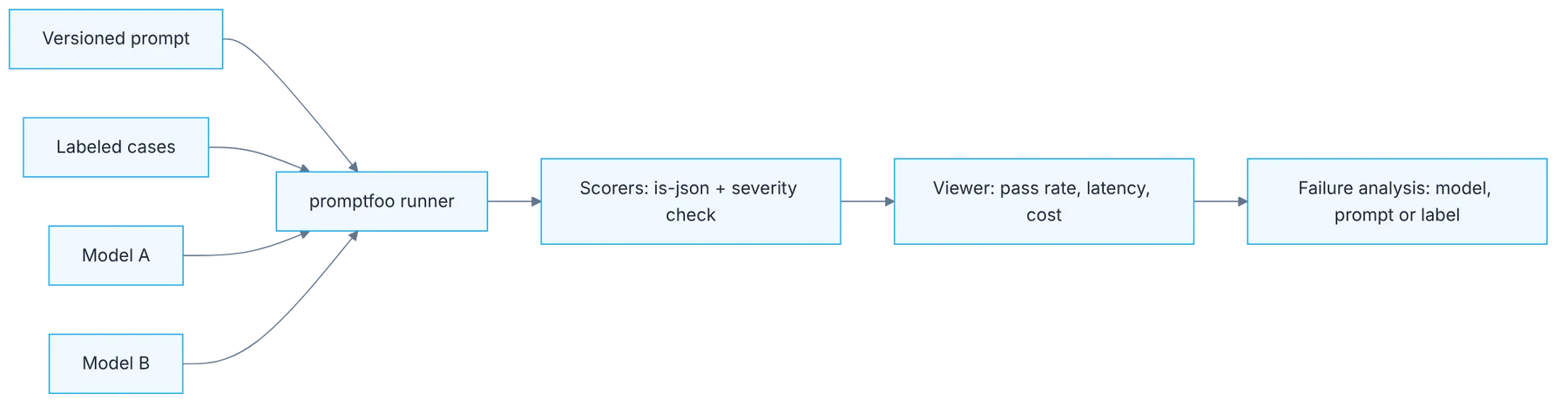
Show the diagram as text
prompts/bug-triage.txt ──┐
labeled cases ───────────┤
model A · model B ───────┴─▶ promptfoo runner
                               ▼
                    scorers: is-json + severity check
                               ▼
                    viewer: pass rate · latency · cost
                               ▼
                    failure analysis: model / prompt / label
Requirements
- The
qa-ai-labrepo with promptfoo (day 4). - Ollama with
llama3.2; optionally a second model.
Setup
You are a bug triage assistant. Classify the report.
Return only JSON: {"severity": "critical|high|medium|low", "component": "string"}
Rules: payment or login blocked = critical. Cosmetic = low.
Report: {{report}}description: bug triage classifier
prompts:
- file://../prompts/bug-triage.txt
providers:
- ollama:chat:llama3.2
defaultTest:
assert:
- type: is-json
tests:
- vars: { report: "Checkout button does nothing on Safari, users cannot pay" }
assert:
- type: javascript
value: JSON.parse(output).severity === 'critical'
- vars: { report: "Typo in the footer: Contcat us" }
assert:
- type: javascript
value: JSON.parse(output).severity === 'low'npx promptfoo eval -c evals/bug-triage.yaml --repeat 3
npx promptfoo viewStep by step
1. The prompt as a file
Write the prompt in its own file, with classification rules and output format. The prompt is code: version it.
Write the prompt under prompts/ in three parts: the role, the classification rules and the exact output format. The rules must be yours, written the way you'd explain them to someone new: what makes a bug critical, what makes it low. The more explicit they are, the less the model interprets. The output format is written down too, with the allowed values. Keeping it in a separate file lets you see in a diff which word changed when quality goes up or down.
2. The minimal config
Create the config: prompt, provider and a defaultTest with the format assert that applies to every case.
The config joins three things: which prompt, against which provider and with which cases. The defaultTest block is the most useful piece to start with: it holds the format assert that applies to every case without repeating it. If the output isn't valid JSON with an allowed severity, the case fails there and nothing else is evaluated. Keep the config short. A file that fits on one screen gets read by the whole team; a three-hundred-line one, by nobody.
3. Ten cases labeled by you
Load at least 10 cases labeled by you: 3 critical, 3 low and 4 ambiguous. The ambiguous ones teach the most.
Pick ten real or realistic reports and write the expected severity before running anything. The mix matters: three clearly critical, three clearly low and four ambiguous. The clear ones verify that the basics work. The ambiguous ones discriminate: a report saying "the app closes" without saying in which flow, or a cosmetic one on the payment screen. If labeling a case is hard, note why. That doubt is usually a rule missing from the prompt.
4. Three runs per case
Run with --repeat 3. A case that passes one out of three times is not passing.
A single run says nothing about a system that varies. With three repetitions each case lands in one of three situations: always passes, always fails or is unstable. The unstable ones are the most interesting, because they show where the prompt leaves room for interpretation. Treat a case that passes one time in three as failed: in production that case will be misclassified a good part of the time. Note the total time and cost of the run, which you will need later.
5. Reading failures one by one
Open the viewer and read failures one by one. Classify them: model error, prompt error or labeling error.
Open the viewer and read each failure with its full input and output. Classify it under one of three causes. Model error: the rules were clear and it didn't follow them. Prompt error: the rule was missing or ambiguous. Labeling error: on rereading, the model's answer is defensible and your label isn't. The third cause shows up more than you'd expect, and finding it improves your judgment. Fix the prompt and the labels first, and only then think about changing models.
6. A second provider
Add a second provider and compare quality, latency and cost side by side.
Add another model to the providers list and run again. The viewer shows both side by side on the same cases. Compare three things: pass rate, latency and cost per run. Often the larger model wins by a little on quality and loses by a lot on the other two. Ten cases aren't enough for a final decision, but they are enough to rule options out and to have, for the first time, a comparison based on your data and not on a public leaderboard.
Illustrative example
A QA lead builds the eval with ten reports from her backlog. In the first run, with three repetitions, seven cases always pass, one always fails and two are unstable. The one that always fails is a labeling error: she had marked it low, but it affects login and the model marked it critical with good reason. The two unstable ones are reports with no reproduction steps. She adds a rule to the prompt: "if data is missing to decide, classify as medium and ask for the steps". In the second run, all ten cases pass three times. The change was one prompt line and one label.
Common mistakes
- Labeling cases after seeing the model's answer.
- Using only easy cases and concluding the prompt works.
- Evaluating content when the format already failed.
- Switching models before reviewing the prompt and the labels.
Checklist: how to know it is done
- The prompt is in a file with rules and output format.
- There are ten labeled cases, four of them ambiguous.
- Each case ran three times and you know which are unstable.
- Each failure has an assigned cause: model, prompt or label.
Where AI fell short
Small models wrap JSON in extra text. Validate format before content or you'll misdiagnose.
Frequently asked questions
Aren't ten cases too few?
For a release decision, yes. For learning the cycle and finding the prompt's first problems, they're enough. What matters is that the eval exists and runs; it then grows with real cases. Day seventeen covers how to turn it into a serious dataset.
What do I do if the local model returns text around the JSON?
First ask in the prompt for the JSON only, with an example. If it keeps happening, that's a fact about that model for that task. Don't fix it by cleaning the output inside the eval without recording it, because your application will receive the same thing.
Does it work for a task other than classification?
Yes. The structure is the same for extracting fields, summarizing or answering questions: prompt in a file, shared format assert, labeled cases, several runs and reading failures. The scorers change, not the method.
Day 8 of 31 of the 31 days of QA + AI series. Commands and versions reviewed in November 2026: rerun them before relying on them, AI tooling changes fast.
← Previous: Harnesses 101: test harness, eval harness and agent harness
Next: Agent harness for QA: rules, skills and MCP in your automation repo →