Guide · QA + AI series · 6/31 · November 13, 2026 · 7 min read
Synthetic test data with LLMs: realistic, valid and PII-free
A test dataset combining Faker for volume and an LLM for edge cases, validated against a schema and with no production data.
Test data is one of the oldest bottlenecks in QA. Either you use a copy of production, with all the legal risk that implies, or you use data so tidy it never triggers a bug: names without accents, perfect addresses, round amounts. Real defects show up with the surname that has an apostrophe, the email with a subdomain or the note someone filled in with an emoji.
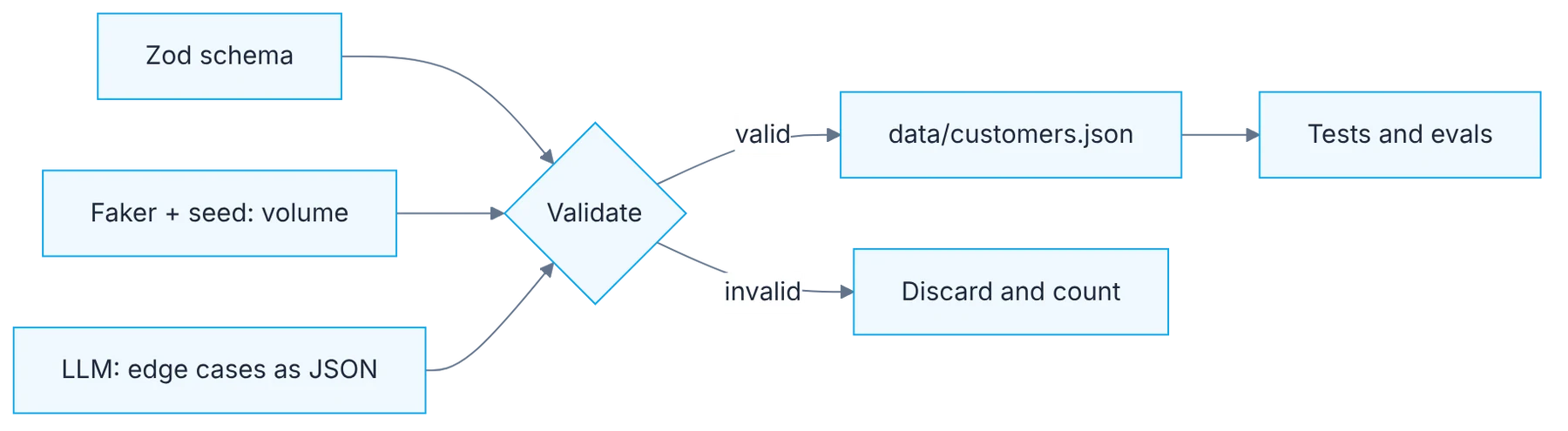
An LLM is good at exactly that: producing realistic variety. But it also produces invalid rows with great confidence. This guide combines three pieces to keep the best of each: a schema that defines what is valid, Faker for volume and the model only for the odd cases, with automatic validation of every row.
How it fits together
Show the diagram as text
Zod schema ─────────────────────────┐
Faker + seed (volume) ──────────────┤
LLM (edge cases as JSON) ───────────┴─▶ validate
                                         ├─ valid   ▶ data/customers.json ▶ tests and evals
                                         └─ invalid ▶ discard + count
Requirements
- The
qa-ai-labrepo. - A local model with Ollama.
Setup
npm i -D @faker-js/faker zod tsximport { z } from "zod";
export const Customer = z.object({
name: z.string().min(1).max(80),
email: z.string().email(),
birthDate: z.string().date(),
notes: z.string().max(280),
});import { faker } from "@faker-js/faker";
import { Customer } from "./customer.schema";
faker.seed(42);
const rows = Array.from({ length: 100 }, () => ({
name: faker.person.fullName(),
email: faker.internet.email(),
birthDate: faker.date.birthdate().toISOString().slice(0, 10),
notes: faker.lorem.sentence(),
}));
console.log(rows.filter((r) => Customer.safeParse(r).success).length, "valid rows");Step by step
1. The schema rules
Define the schema first. It's the source of truth for what valid data is.
Write the schema before generating a single row. It's the contract for your data: which fields exist, what type they are, which ranges they accept and which are required. With Zod or JSON Schema you express it once and use it in three places: to validate what Faker produces, to validate what the model produces and as documentation for the team. If the schema is loose, for example it accepts any string as a date, invalid data slips through and you'll discover it in a test failing for the wrong reason.
2. Faker for volume
Use Faker with a fixed seed for volume: fast, free and reproducible.
For the thousands of "normal" rows you don't need a model. Faker generates them in milliseconds, at no cost and with no network. What matters is pinning the seed: with the same seed you get exactly the same data on your machine, on your teammate's and in CI. That turns an intermittent failure into a reproducible one. Also choose the locale matching your users, because it changes the format of names, phone numbers and addresses, and those formats are part of what you want to test.
3. The model for the odd cases
Use the LLM for what Faker can't give: realistic edge cases (apostrophes in surnames, accented names, emails with subdomains, notes with emojis or quotes).
Ask the model for what a library can't invent: believable variants that break assumptions. Be specific in the request. Instead of "generate weird data", list the categories you care about: compound surnames and ones with apostrophes, single-letter names, emails with subdomains and plus signs, free text with quotes, line breaks or emojis, dates at the edge of a range. Ask for a few rows per category. Ten well-thought-out cases are worth more than five hundred similar ones, and they are cheaper to review.
4. Row-by-row validation
Ask the model for JSON output and validate every row against the schema. Whatever fails gets discarded and counted.
Ask for JSON output and pass every row through the schema before accepting it. Whatever doesn't validate gets discarded and counted. That counter is a useful metric: if the model fails one row in four, the prompt needs a format example or the schema has a rule you didn't explain. Don't fix invalid rows by hand, because that breaks reproducibility. Don't trust a visual review either: a date such as 2026-02-30 looks perfect and doesn't exist.
5. Production stays out of the prompt
Never paste production data into the prompt. Describe the shape of the data, not the data.
The rule is simple and has no exceptions: the prompt carries the shape of the data, never the data. Describe fields, formats and oddities you want to see, without pasting real records, not even "hand-anonymized" ones, because that anonymization almost always leaves something identifiable. If you need synthetic data to resemble the real data statistically, describe the distributions in words. And verify the result: check that no names or ID numbers match real people in your database.
6. Seed, prompt and dataset versioned
Version the seed, the prompt and the final dataset in data/. A dataset you can't regenerate is debt.
Store in data/ the three things that let you regenerate the set: the Faker seed, the prompt used with the model and the final, already validated file. The part generated by the model isn't reproducible bit for bit, which is why you version the result and not just the recipe. Also note the model and the date. When a test fails six months from now, you'll be able to tell which data it ran with, and if the set needs extending you'll start from something known.
Illustrative example
A team tests a customer sign-up form. With Faker and a fixed seed they generate a thousand valid customers in under a second. Then they ask the model for twenty odd cases across five categories. Of the twenty rows, the schema rejects four: two impossible birth dates, a phone number with letters and an email with no domain. Sixteen remain. Running the suite with those sixteen, two tests fail: the surname O'Connor breaks a badly escaped query and a name with an emoji gets stored truncated. None of the thousand tidy records had found those two defects.
Common mistakes
- Generating everything with the model, even the volume Faker handles for free.
- Accepting rows by how they look, without validating them against the schema.
- Pasting a real record "as a format example".
- Not saving the final dataset and being unable to repeat a run.
Checklist: how to know it is done
- The schema rejects invalid dates, emails and ranges.
- Faker runs with a fixed seed and gives the same result twice.
- Every model row went through the schema and there is a discard count.
- Seed, prompt, model, date and dataset are in
data/.
Where AI fell short
It returns JSON that looks valid and isn't (dates, formats). Without automatic validation, those errors reach your tests.
Frequently asked questions
Is synthetic data enough for performance tests?
For volume, yes, and Faker is the right tool there. What needs care is the distribution: if every customer has the same number of orders, queries behave differently than in production. Describe those proportions and generate them on purpose.
How do I know no real personal data slipped in?
By not pasting any into the prompt, which is the only guarantee at the source. As an extra control, cross-check the sensitive values in the dataset against your database and review any matches. If you use a cloud provider, also confirm its retention policy.
What about relationships between tables?
Generate parent entities first with stable identifiers, then the children referencing those identifiers. Validate integrity with a check of your own, because a row-level schema doesn't see relationships across files.
Day 6 of 31 of the 31 days of QA + AI series. Commands and versions reviewed in November 2026: rerun them before relying on them, AI tooling changes fast.
← Previous: Test cases from user stories: the prompt that actually works
Next: Harnesses 101: test harness, eval harness and agent harness →