Guide · QA + AI series · 4/31 · November 13, 2026 · 7 min read
Your AI QA lab: full setup in 30 minutes
The lab repo used for the rest of the series: local model, eval tool, Playwright and secrets handling.
Most tutorials on AI applied to testing assume you already have a working environment, an API key with credit and time to wrestle with versions. In practice, that start is where many people give up. This guide solves the starting point: a small, reproducible, free repository you will reuse on every day that follows.
The central decision is to work with a local model. It isn't the most capable, but it has three advantages for learning: it costs nothing, no data leaves your machine and its errors are frequent, which is ideal for practicing how to measure them. When you need more quality, switching to a cloud model is one configuration line.
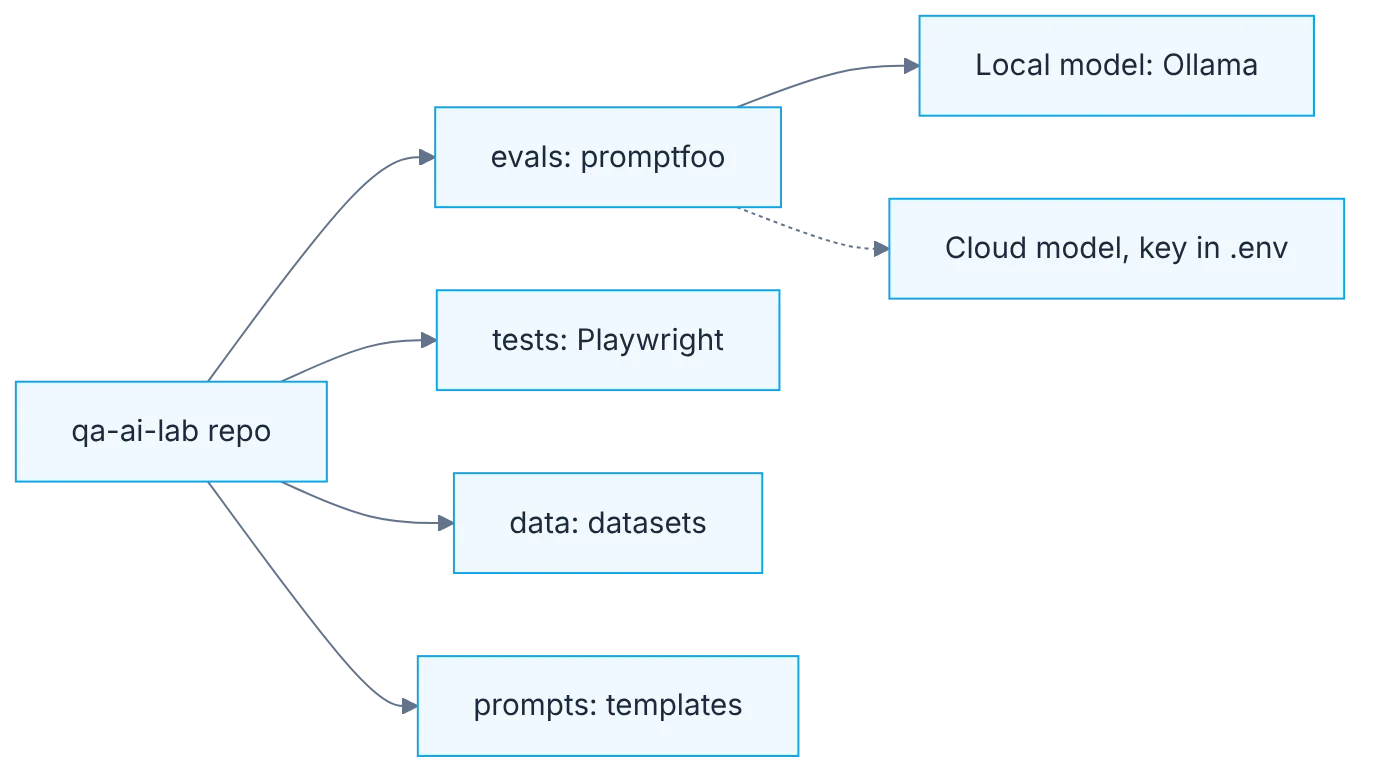
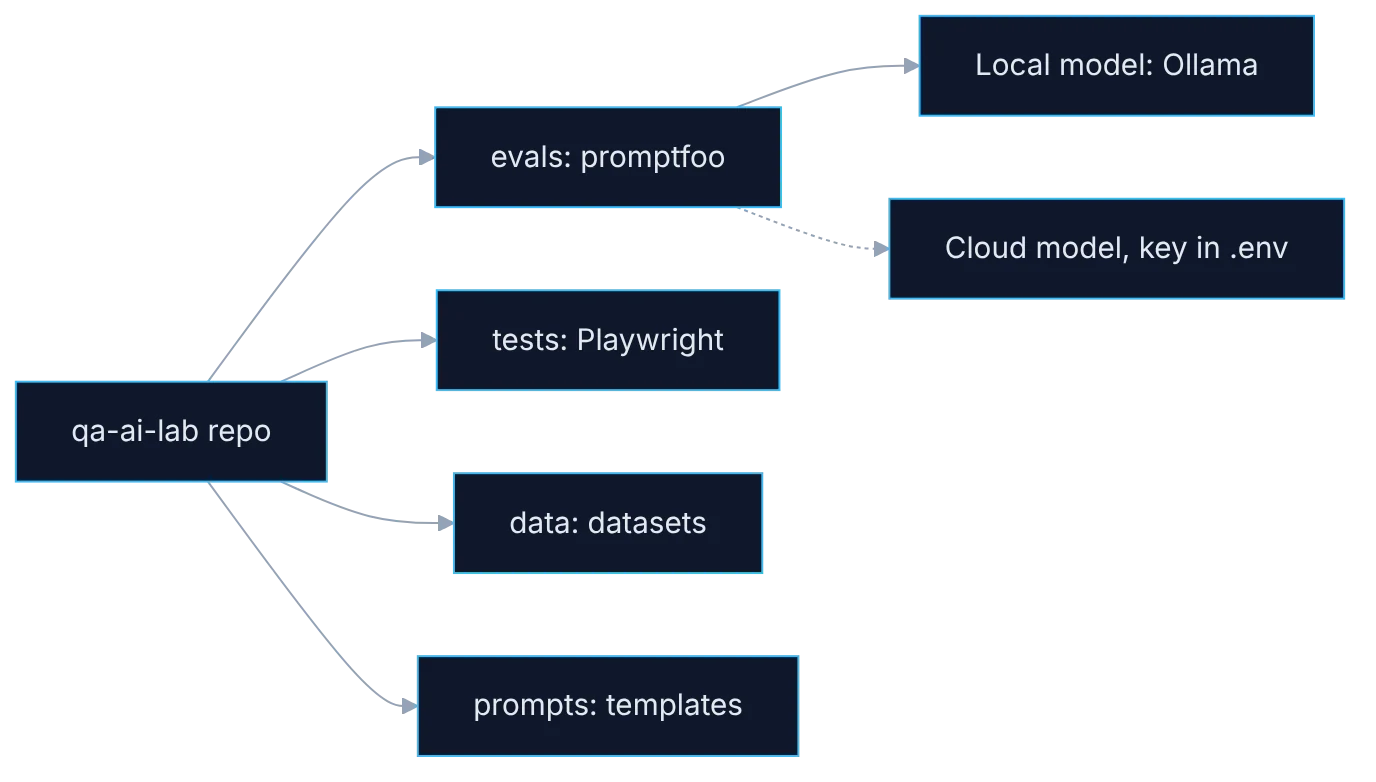
How it fits together
Show the diagram as text
qa-ai-lab/
   ├─ evals/     promptfoo configs ──▶ local model (Ollama)
   │                              └─▶ cloud model (optional, key in .env)
   ├─ tests/     Playwright
   ├─ data/      datasets
   └─ prompts/   versioned prompt templates
Requirements
- Node.js 22+ and Python 3.10+.
- Git.
- Ollama, to run a local model at no cost.
- Optional: a provider API key.
Setup
node -v && python3 --version && git --version
ollama pull llama3.2
ollama run llama3.2 "Reply with OK"

mkdir qa-ai-lab && cd qa-ai-lab && git init
npm init -y
npm i -D promptfoo @playwright/test
npx playwright install chromium
mkdir evals tests data prompts
printf ".env\nnode_modules\n" > .gitignoredescription: lab smoke test
prompts:
- "Answer briefly: what is the capital of {{country}}?"
providers:
- ollama:chat:llama3.2
tests:
- vars: { country: Argentina }
assert:
- type: icontains
value: Buenos Airesnpx promptfoo eval -c evals/smoke.yaml
npx promptfoo viewStep by step
1. Versions first
Check Node, Python and Git versions. If Node is below 22, upgrade first.
Run the three version commands before installing anything. Eval tools and coding agents ask for recent Node versions, and a good share of odd install errors come from an old Node. If you use a version manager, pin the version in a file such as .nvmrc so anyone cloning the repo uses the same one. You will need Python later for RAG evals and for measuring performance, so it's worth verifying now.
2. A local model
Install Ollama, pull llama3.2 and confirm it replies. You now have a free model with no data leaving your machine.
Ollama runs models on your machine and exposes an OpenAI-compatible API on port 11434. That means almost any tool that can talk to a cloud provider can talk to your local model by changing the URL. A small model is enough to start and runs without a dedicated graphics card, only slower. Confirm it replies from the terminal before moving on: if that step fails, everything else will fail with less clear errors.
3. Repo structure
Create the qa-ai-lab repo with evals, tests, data and prompts folders.
Four folders with one purpose each. evals holds evaluation configs. tests, the Playwright tests. data, datasets and schemas. prompts, prompt templates as text files. Keeping prompts apart from code has a practical reason: they can be versioned, compared across versions and reviewed in a pull request like any other change. A prompt embedded in a string inside code never gets reviewed.
4. Development dependencies
Install promptfoo and Playwright as dev dependencies so versions travel with the repo.
Install promptfoo and Playwright as project dev dependencies, not globally. That way versions are recorded in the lockfile and two people with the same repo get the same result. With tools that change every few weeks, a different global install on each machine is a constant source of unexplained differences. Install only Chromium for now: what follows doesn't need the other browsers and the download is much lighter.
5. Secrets out of the repo
Secrets: API keys go in .env, and .env goes in .gitignore before the first commit.
Even if today you only work with a local model, settle secrets handling before the first commit. API keys go in a .env file listed in .gitignore. Commit a .env.example instead, with variable names and no values, to document what is needed. A key that reaches a repository, even a private one, must be considered compromised and rotated; preventing it costs one line.
6. The smoke eval
Run the smoke eval. One green case in the table and in the web viewer means the lab is ready.
The sample file has a prompt with one variable, a local provider and a test with a case-insensitive assert. Running it verifies the whole chain: the tool installed, the model answering and the assert evaluating. The web viewer shows each case with its input, output and result. Keep it as the first step of any work session: if the smoke eval fails, the problem is the environment and not whatever you are testing.
Illustrative example
A tester follows the steps on a work laptop with no graphics card. Node was on version 18 and the promptfoo install showed warnings; she upgrades to 22 and they disappear. She pulls the local model and the first reply takes several seconds, which is expected on that machine. She creates the repo, adds .env to .gitignore and runs the smoke eval: one green case. Then she adds a second test with another country and runs it again. In half an hour she has an environment she can clone on another machine and get the same result.
Common mistakes
- Installing tools globally and losing control of versions.
- Making the first commit before adding
.envto.gitignore. - Skipping the terminal check of the model and debugging confusing errors later.
- Leaving prompts as strings inside code.
Checklist: how to know it is done
- Node 22 or later, Python and Git verified.
- The local model replies from the terminal.
- The repo has the four folders and
.envignored. - The smoke eval shows two green cases in the viewer.
Where AI fell short
Assistants suggest outdated flags and versions. A command you haven't run is a hypothesis.
Frequently asked questions
Can I follow the series without a graphics card?
Yes. A small model runs on CPU, only slower: replies take seconds instead of tenths of a second. That's enough for learning. If your machine is short on memory, use an even smaller model or a cloud provider with a low spending limit.
What if I can't install Ollama at my company?
Use the provider your company has already approved and change only the provider line in the config. Everything else in the repo stays the same. Ask first which data you are allowed to send: these exercises need no real data at all.
Why promptfoo and Playwright and not other tools?
Because they are open source, run locally and integrate easily into CI. The concepts in the series don't depend on them: dataset, scorers, threshold and gate exist just the same in other tools, and you'll be able to carry over what you learn.
Should I use a container for the lab?
Not to begin with. When you take it to CI you will, and we cover that on the infrastructure day. For now, pinning versions in the lockfile and in .nvmrc is enough. If two people on the team get different results from the same repo, compare Node and tool versions first: that explains most differences.
Day 4 of 31 of the 31 days of QA + AI series. Commands and versions reviewed in November 2026: rerun them before relying on them, AI tooling changes fast.
← Previous: The new ways of testing: from asserts to evals
Next: Test cases from user stories: the prompt that actually works →