Guide · QA + AI series · 1/31 · November 13, 2026 · 6 min read
LLMs in QA: the 2026 map, where they help and where they don't
Six LLM uses in QA that work today, three that don't, and a simple rule to decide when to delegate.
In 2026 almost every QA team uses some LLM, but few can say which tasks it really speeds up and which ones it makes riskier. The usual outcome is to use it for everything for two weeks, run into invented test cases and a couple of brittle tests, and go back to working as before.
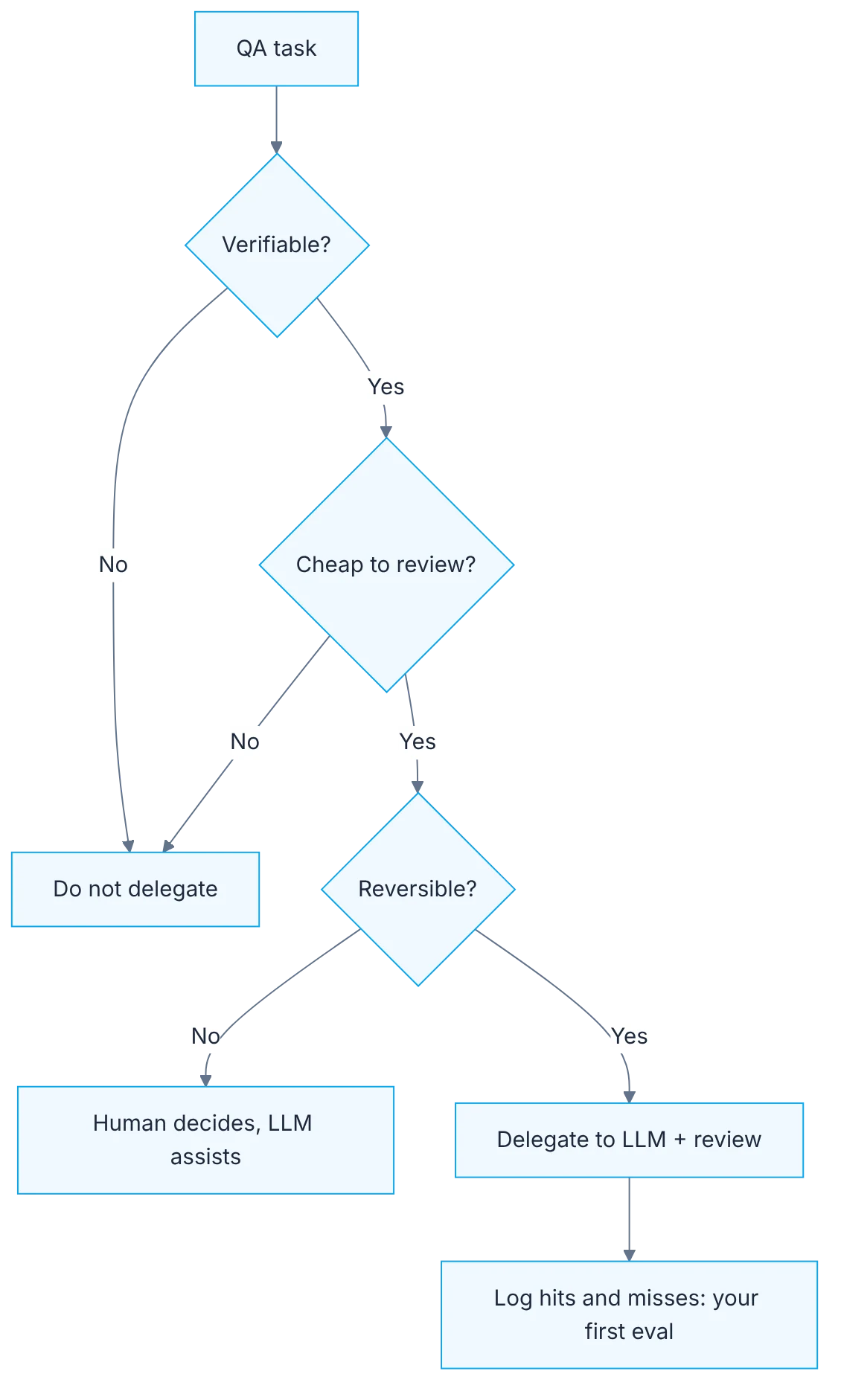
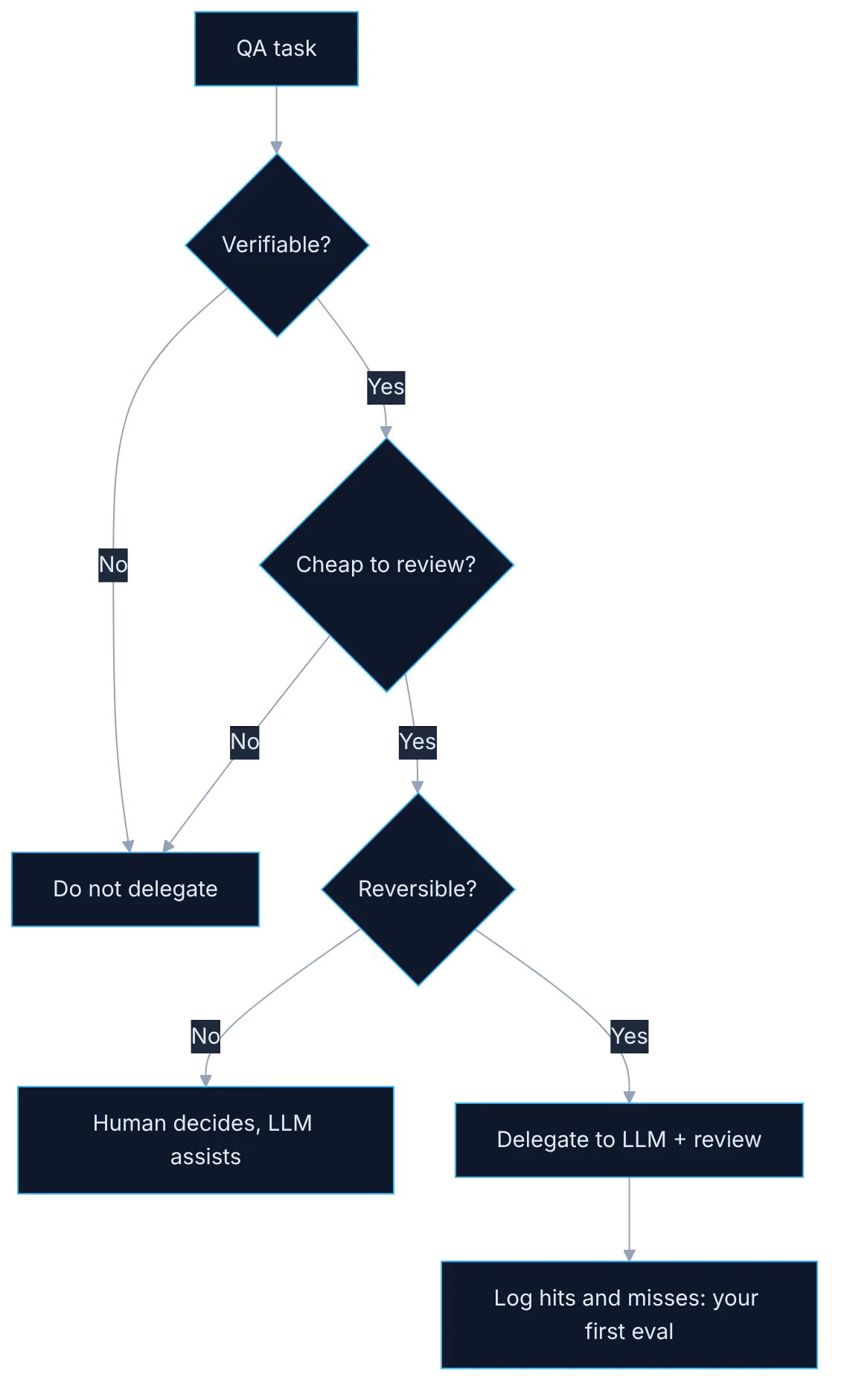
This guide sorts that ground out. It doesn't start from the tool but from your tasks: which are text to text, which have a source of truth to compare against, and which can be undone if they go wrong. That is enough to build your own map and a decision rule you will use for the whole series.
How it fits together
Show the diagram as text
QA task
  └─ Verifiable? ── no ──▶ do not delegate
        │ yes
        ▼
     Cheap to review? ── no ──▶ do not delegate
        │ yes
        ▼
     Reversible? ── no ──▶ human decides, LLM assists
        │ yes
        ▼
     Delegate to LLM + review ──▶ log hits and misses (your first eval)
Requirements
- A real user story from your backlog.
- Any LLM: Claude, ChatGPT or a local model with Ollama.
- 20 minutes.
Step by step
1. Inventory of real tasks
List last week's QA tasks and flag the text-to-text ones: analyze, draft, classify, summarize.
Open last week's calendar and board and write each task down with a verb: review a requirement, write cases, prepare data, automate a flow, analyze a red pipeline, report a bug. Don't list what you'd like to do, list what you did. Next to each one, note how long it took. Text-to-text tasks that also eat hours are the first candidates, because the model produces a draft in seconds and you move from writing to reviewing.
2. The six uses that pay off
Place them in the six uses that work: requirements and ambiguity analysis, test design from user stories, test data, writing and refactoring automation with agents, failure triage over logs and traces, and evals for AI-powered features.
Each one works for the same reason: there is something to compare against. In requirements analysis you compare against the product owner. In test design, against the business rules. In test data, against a schema. In automation, against the test run. In triage, against the trace. In evals, against a labeled dataset. If you can't name that point of comparison for a task, it doesn't belong on this list yet, however neat the output looks.
3. The three uses that fail
Cross out the three that don't: release decisions with no human, the model as an oracle with no source of truth, and merging generated UI tests unreviewed.
A release decision is a business risk judgment, and the model neither knows your context nor answers for the decision. Using it as an oracle with no source of truth produces confident and sometimes false answers, the worst combination for QA. And UI tests generated in bulk tend to pass once and fail a week later, because they rely on guessed selectors and fixed waits. They aren't forbidden: they need a person to look at the result before calling it good.
4. The three-question rule
Apply the rule: delegate only if the result is verifiable, cheap to review and reversible.
Verifiable means an objective check exists: a test that runs, a schema, a written rule. Cheap to review means reading it costs you much less than doing it yourself; if reviewing forty generated cases takes longer than writing fifteen good ones, you gained nothing. Reversible means a mistake leaves no consequences: a draft gets discarded, a merge to production doesn't. If one of the three fails, AI can assist, but the decision and the signature are yours.
5. First trial with a user story
Try it: paste your user story and ask "before writing cases, list ambiguities and questions for the PO".
Pick a story already in development, so you can compare with what the team found out the hard way. Paste the full text with its acceptance criteria and ask only for ambiguities and questions, not cases. Note how many questions are real, how many were already answered elsewhere and how many don't apply. That ratio tells you whether, in your domain, it's worth using in refinement or whether it first needs more written context.
6. The log of hits and misses
Write down what it got right and what it made up. That log is your first eval.
Build a simple table with four columns: task, what you asked, what it got right and what it made up. Fill it in for two weeks every time you use a model for something in QA. Without that log, your opinion of the tool will depend on the last result you saw. With it you have evidence to decide where to keep using it, plus the first draft of an evaluation dataset, which is exactly what we build later on.
Illustrative example
An analyst takes the story "apply a discount coupon at checkout". She asks the model for ambiguities and gets seven questions. Three are real and nobody had asked them: what happens if the coupon expires mid-purchase, whether it combines with free shipping and how rounding works. Two were already answered in the rules document. The other two assume a "one coupon per customer" rule that doesn't exist. Result in the table: three hits, two leftovers and two inventions. Ten minutes of work and three questions that prevented a production bug. That use passes the rule: verifiable with the PO, cheap to read and with no consequences if discarded.
Common mistakes
- Judging the tool by a demo or the last result, with no log of hits and misses.
- Asking for the final deliverable (cases, tests) before asking for questions and ambiguities.
- Accepting a result because it reads well, without comparing it against a source of truth.
- Measuring savings only in writing time and forgetting review time.
Checklist: how to know it is done
- You have ten real tasks classified as delegable or not.
- Each delegable task names what it gets verified against.
- You ran the ambiguity prompt on a real story.
- Your table has at least three hits and one error logged.
Where AI fell short
It makes up business rules with full confidence. Without a source of truth next to it, it is not an oracle.
Frequently asked questions
Which model should I start with?
Whichever you already have available. For this exercise the method matters more than the model: the same three questions work with a small local model or a commercial one. Switching models later is easy; switching the habit of not verifying is not.
Does it help if my team doesn't automate yet?
Yes. Four of the six uses (requirements, test design, data and triage) need no automation framework. They are in fact a good entry point, because the output is text you can review with what you already know.
How long does building the map take?
One hour for the inventory and classification, and two weeks of use for the hits-and-misses table to hold enough data. Don't close it earlier: first impressions tend to be either too optimistic or too negative. Review the table with your team at the end, because other people's entries usually show uses and failures you didn't run into yourself.
Day 1 of 31 of the 31 days of QA + AI series. Commands and versions reviewed in November 2026: rerun them before relying on them, AI tooling changes fast.